What feeds into the decision
- Daily use (kWh) — your average consumption.
- Usage profile — when you use power through the day and year. Evening-heavy homes need more solar, or a battery, to cover the same bills.
- Tariffs — what you pay to import and what you earn on export. A good feed-in rate rewards a bigger array; a low export rate favours matching your use rather than oversizing.
- Roof space — from site assessment. This is the hard upper limit on panel count.
What are you optimising for?
Photonik shows these outcomes as you change size:
- Fastest payback — recover install cost soonest. Often favours a moderate size.
- Biggest annual savings — lowest bills in the near term.
- Biggest 25-year net savings — best lifetime result after costs. The quiz below focuses here and on payback.
- Largest emissions savings — offset more fossil-fuel power. Most meaningful where extra export displaces dirty grid supply, not where the grid is already clean or oversupplied at midday.
- Self-sufficiency — meet your own use year-round. Usually needs a battery and enough solar to cover weaker winter weeks.
While you work in System Design, price, estimated savings, and the Electricity Usage & Generation chart on the right all update as you change the design. Slide panel count and watch generation, self-use, export, and grid import shift.
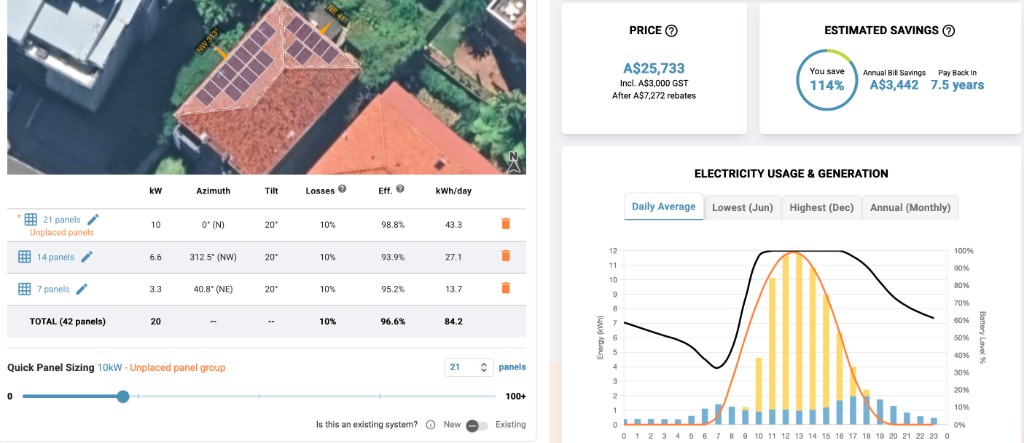
Common sizing approaches
- Match usage (~1:1) — annual generation roughly equals annual use. A simple starting point; works best with strong net metering or high daytime self-use.
- Oversize by 50–100% — Photonik’s default recommendation. Covers cloudy days and seasonal dips. If export pays reasonably (up to roughly half what you pay to import), extra panels can push bills close to zero.
- Size for winter — bigger than your annual average so winter output still covers winter load. For evening-out bills through the year, or with a battery on a self-sufficiency goal.
- Size for future loads — headroom for an EV, heat pump, a growing household, a battery added later, or more export income.
- Fill the roof — when space is tight, or when you want maximum generation for savings or emissions. If roof space is limited, this may be your only option. If you have plenty of roof, check whether extra panels still improve your goal.
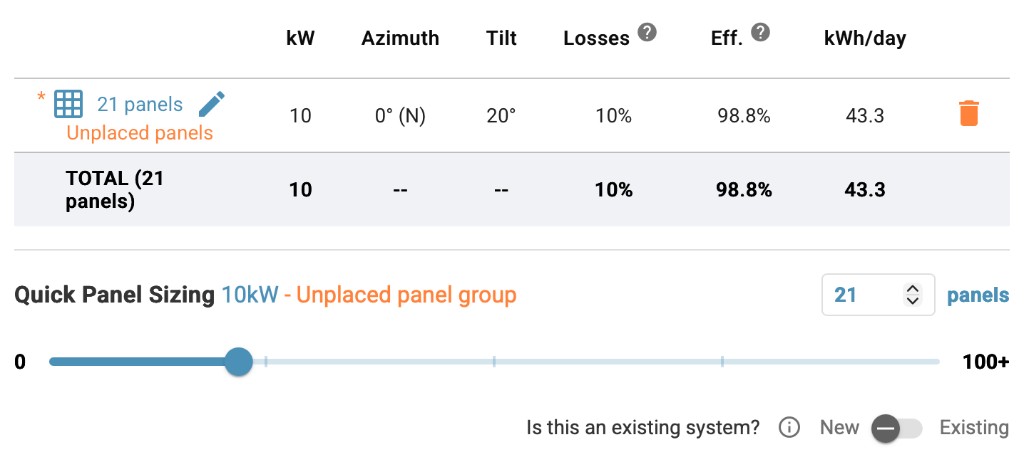
Before placing panels on the roof, you can do a quick sizing check. In Photonik Pro, open System Design → Quick Panel Sizing. Set panel count with the slider or number field — kW updates with your selected module. Outcomes in the proposal (savings, payback, generation) recalculate as you change size.
The Is this an existing system? toggle marks the unplaced panel group as already installed:
- New (default) — panels you are quoting to install. They count in the cost stack, pricing, and savings.
- Existing — panels already on the roof. They still contribute to generation in the model, but are excluded from pricing and from “new” savings. Use this when the job is mainly an add-on (for example a battery on an array that is already there) rather than a full new install.
The quiz below compares undersized and oversized arrays. Step 5 — Choosing and placing panels covers where panels face and how they fit on the roof.